Digital Signage Software (onQ CMS)

Simple, Fast & Customizable

Digital Signage Software: Power and Simplicity for Managing Your Digital Signage Content

Managing digital signage content should be as easy as it is impactful. That’s why our proprietary Digital Signage Software, onQ CMS is designed to offer a seamless, user-friendly experience while providing the flexibility and power you need to manage your digital signage network.

With our Digital Signage Software, you can schedule, update, and control your digital displays effortlessly. Our cloud-based digital signage software allows you to manage content from any device, anywhere, giving you full control whether you’re operating a single location or managing a national network of screens. Intuitive drag-and-drop functionality makes it easy for anyone on your team to create and deploy content without needing advanced technical skills.

Our Digital Signage Software also supports various media formats, including videos, images, animations, and live feeds. This allows you to diversify your content strategy, keeping your displays fresh and engaging.


onQ CMS Features

Simple, Fast & Customizable

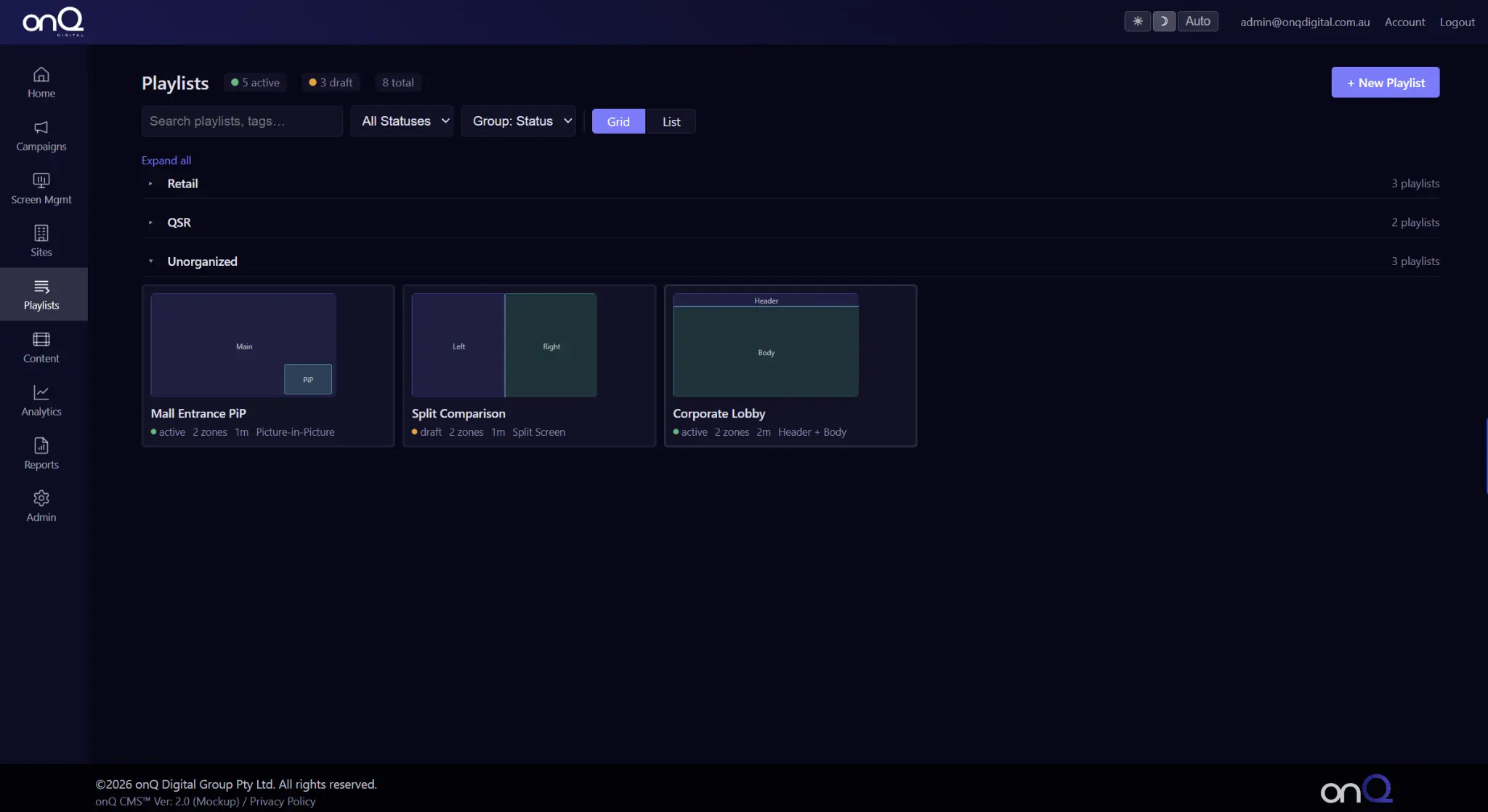
Digital Signage Content Playlists

Our Digital Signage Software allows users to build content playlists within the digital signage software. Users can group and organize similarly themed content or content for occasions into a single playlist. Instead of scheduling each piece of content one-by-one, users can select a playlist and assign it to a specific screen in just a few clicks.

Digital Signage Api Integration

Perhaps you want your digital signage content to display dynamically based on changes in other datasets. For example, maybe you only want your digital signs to show special offers for products that are in-stock. To do this, you must use the onQ digital signage software API to integrate your digital signage content management software with your inventory database.

Multi-user Support

Most businesses have multiple individuals who work on their digital signage strategy. With multi-user support, businesses can easily assign accounts with varying permission levels to relevant employees. Additionally, when an employee changes roles or leaves the company, management can easily remove that employee’s account while keeping top-level administrative access.

Remote Screen Monitoring And Health Checks

The individual responsible for digital signage content management may not be near each sign that they manage. Some digital signage users may not see the screens that they manage for weeks at a time.. Accordingly, it is important that users can remotely monitor the health and playback status of their screens.

Screen Grouping Functionality

For users that have multiple screens, digital signage content management can be a lot of work. Screen grouping allows users to organize multiple screens into a single unit. Once a user groups multiple screens, the user can then update the content on each screen within that group all at once. If there is a special offer that is only applicable to a particular region of retail stores, this special offer can be pushed out to all relevant screens at once rather than screen-by-screen.

Content Tagging

Digital signage tagging helps organize content into categories for easier management. This enables relevant promotions to be displayed automatically during specific seasons or events, enhancing viewer engagement and operational efficiency.

Data Driven Content

Digital menu boards connected to the Point of Sale (POS) system update in real-time, displaying product availability, popular items, and pricing changes. As customers place orders, the menu highlights in-demand dishes and customer favorites, ensuring it only shows what’s currently available.

AI Computer Vision - Driven Context Aware Automation

Using AI computer vision and context-aware automation in digital signage improves engagement and efficiency. The technology recognizes the environment and delivers personalized content based on demographics, behavior, and emotions. Real-time data is used to adjust content dynamically. This improves the viewer experience and operational efficiency.

Content Validity

Content validity is key in digital signage as it displays suitable and current information. Specific dates and times can be set for content display, ensuring it is relevant. For example, promotional content can be programmed for sale periods, boosting viewer engagement and streamlining content management.

onQ CMS Features

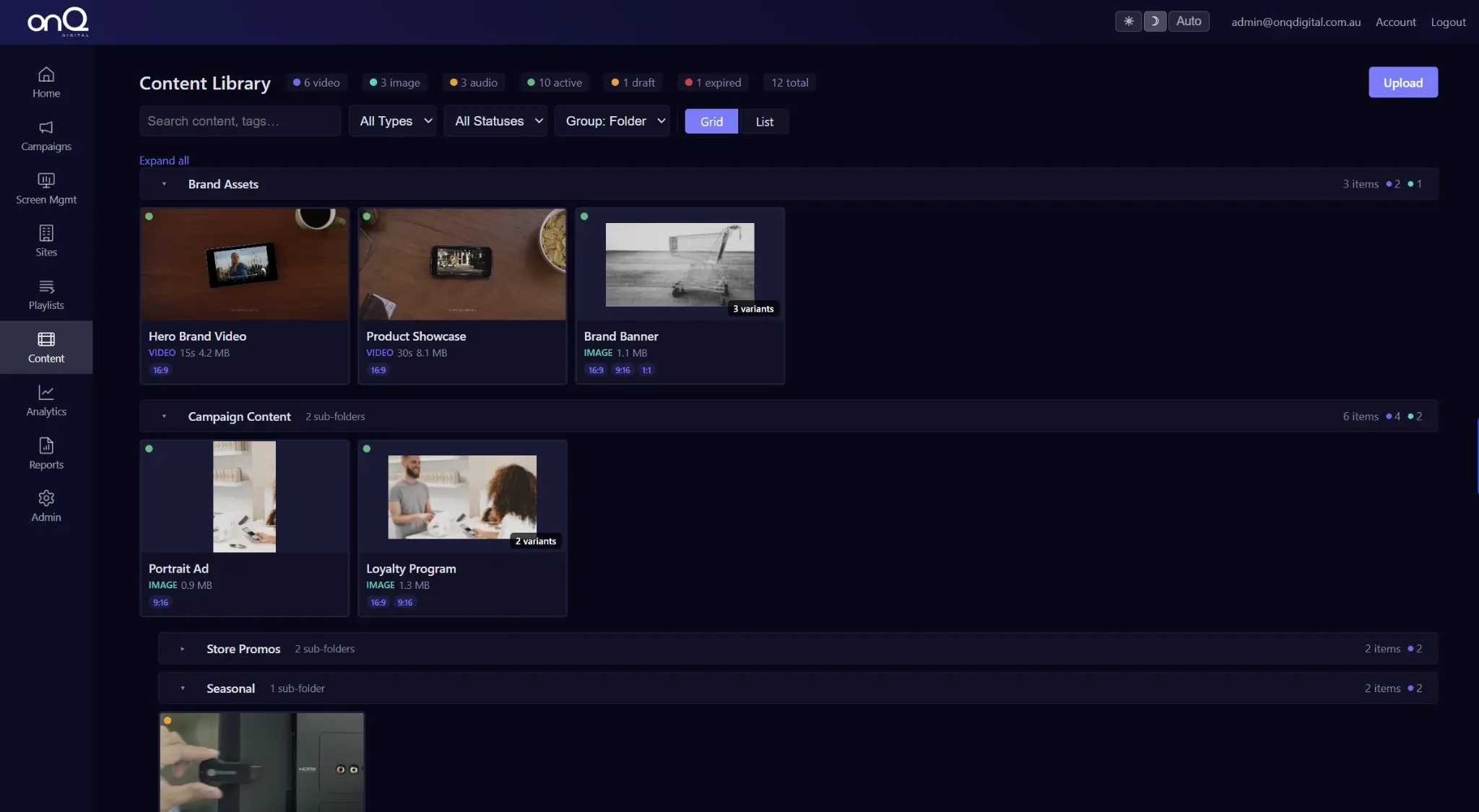
1. Upload your content fast.

Managing your digital signage content has never been easier. With our onQ Digital Signage Software, you can upload photos, videos, and other media files in seconds. Simply click “Upload,” select your desired file from your computer, and watch it seamlessly integrate into your content library. Whether you’re working with high-resolution images, promotional videos, or branded content, the process is designed to be intuitive and efficient.

Folder Organization Made Simple
Keep your content organized and accessible with our drag-and-drop functionality. Group similar files into custom folders to streamline your workflow and ensure you can find the right content when you need it. Whether it’s by campaign, season, or location, our folder system allows you to create an organized, scalable library that grows with your business needs.

Multiple File Formats Supported
Our Digital Signage Software supports a wide range of file formats, so you can upload everything from JPEGs and PNGs to MP4s and GIFs without any compatibility concerns. This flexibility ensures you’re never limited in your creative vision and can deliver dynamic, engaging displays to your audience.

2. Create a new playlist.

With onQ Digital Signage Software, creating and managing playlists for your digital signage has never been simpler. Our cloud-based software empowers you to build, customize, and organize playlists to perfectly align with your content strategy and audience engagement goals.

Unlimited Playlists for Maximum Flexibility
There’s no limit to the number of playlists you can create. Whether you’re running multiple campaigns, targeting different audiences, or managing content across various locations, our CMS ensures you have the flexibility to organize your media exactly how you need it.

Drag-and-Drop Functionality
Arranging your playlists is as easy as a simple drag-and-drop. Whether you need to reorder content for a special promotion or adjust your playlists for seasonal campaigns, the process is intuitive and quick.

Schedule Playlists for Optimal Impact
Take control of your content strategy by scheduling playlists to play at specific times or dates. This feature is ideal for running time-sensitive promotions, aligning with special events, or catering to different audiences throughout the day.

3. Schedule to display playlists.

Timing is everything when it comes to delivering impactful content, and onQ Digital Signage Software makes scheduling playlists effortless. Our cloud-based software gives you full control over when and where your content is displayed, ensuring your messages reach your audience at exactly the right moment.

Precision Scheduling
Easily set specific start and end times for your playlists. Whether you’re running time-sensitive promotions, displaying seasonal campaigns, or tailoring content for different times of the day, our scheduling tool ensures your displays are always relevant and impactful.

Date-Specific Displays
Plan ahead by scheduling playlists to appear on certain dates or during specific timeframes. This feature is ideal for holiday campaigns, limited-time offers, or event promotions, allowing you to prepare content in advance and focus on other tasks as the campaign goes live automatically.

Automated Expiration
Keep your content fresh and up-to-date by setting expiration times for playlists. Expired playlists are automatically removed from rotation, ensuring outdated promotions or messages never appear on your screens.

4. Assign your content.

With onQ Digital Signage Software, delivering the right content to the right place is seamless and intuitive. Our content assignment tools allow you to select and deploy playlists to individual screens or groups of screens with just a few clicks, ensuring your message reaches its intended audience effectively.

Simple Screen Selection
Navigate to the “Playlists” tab, choose your desired playlist, and click “Select Screens.” From there, you can assign your playlist to a single display or multiple screens across your network. This streamlined process makes it easy to target specific locations or audiences without hassle.

Group Screens for Efficient Management
For larger networks, group your screens by location, campaign, or audience type. Assigning playlists to these groups ensures consistency and saves time when deploying content across multiple displays.

Flexible Content Delivery
Whether you’re running a national campaign or a localized promotion, you have the flexibility to tailor your content strategy. Assign different playlists to different screens, ensuring that each display shows content that resonates with its audience.

Digital Signage Content Management Software (CMS)

Managing digital signage content should be as straightforward as it is impactful. Our proprietary onQ Digital Signage Software offers a seamless, user-friendly experience, providing the flexibility and power needed to manage your digital signage network efficiently.

With onQ Digital Signage Software, you can effortlessly schedule, update, and control your digital displays. Our cloud-based digital signage software enables content management from any device, anywhere—ideal for both single-location operations and national networks of screens. The intuitive drag-and-drop functionality empowers your team to create and deploy content without requiring advanced technical skills.

Our digital signage CMS supports various media formats, including videos, images, animations, and live feeds, allowing you to diversify your content strategy and keep your displays engaging.

Compatible Devices

Flexible, Customisable, Extensible, Built For Scalability

onQ CMS Digital Signage Software

Your Digital Signage

Control centre

onQ CMS is a cloud-based digital signage platform built for organisations that operate screen networks not just screens. Manage, schedule, monitor, and report across every site from a single governed dashboard.

‍Unlimited

Users & Roles

Real-Time

Content Updates

35+

DSP Intergrations

100%

Proof-of-play Logged

24/7

Device Monitoring

platform overview

Every Module. One Platform.

Explore each module of the onQ CMS dashboard, from campaign management to proof-of-play reporting.

Your Network at a Glance

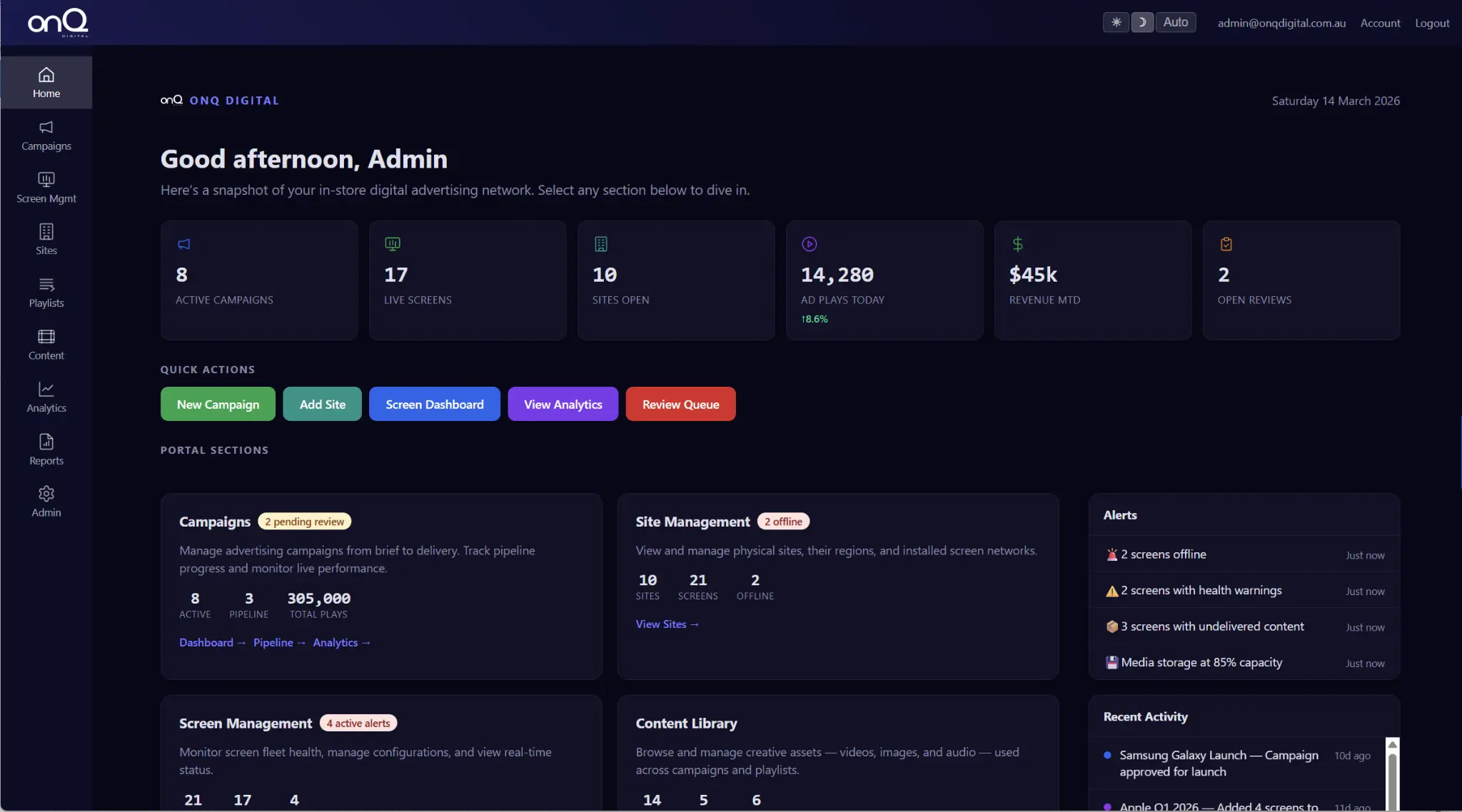
The onQ CMS home dashboard surfaces the metrics that matter active screens, campaign status, device health, and proof-of-play all in a single, real-time view. No more manual checks or spreadsheet reconciliation.

Real-time screen status

Campaign performance overview

Devivce health monitoring

Proof-of-play summary

Campaign Management at Scale

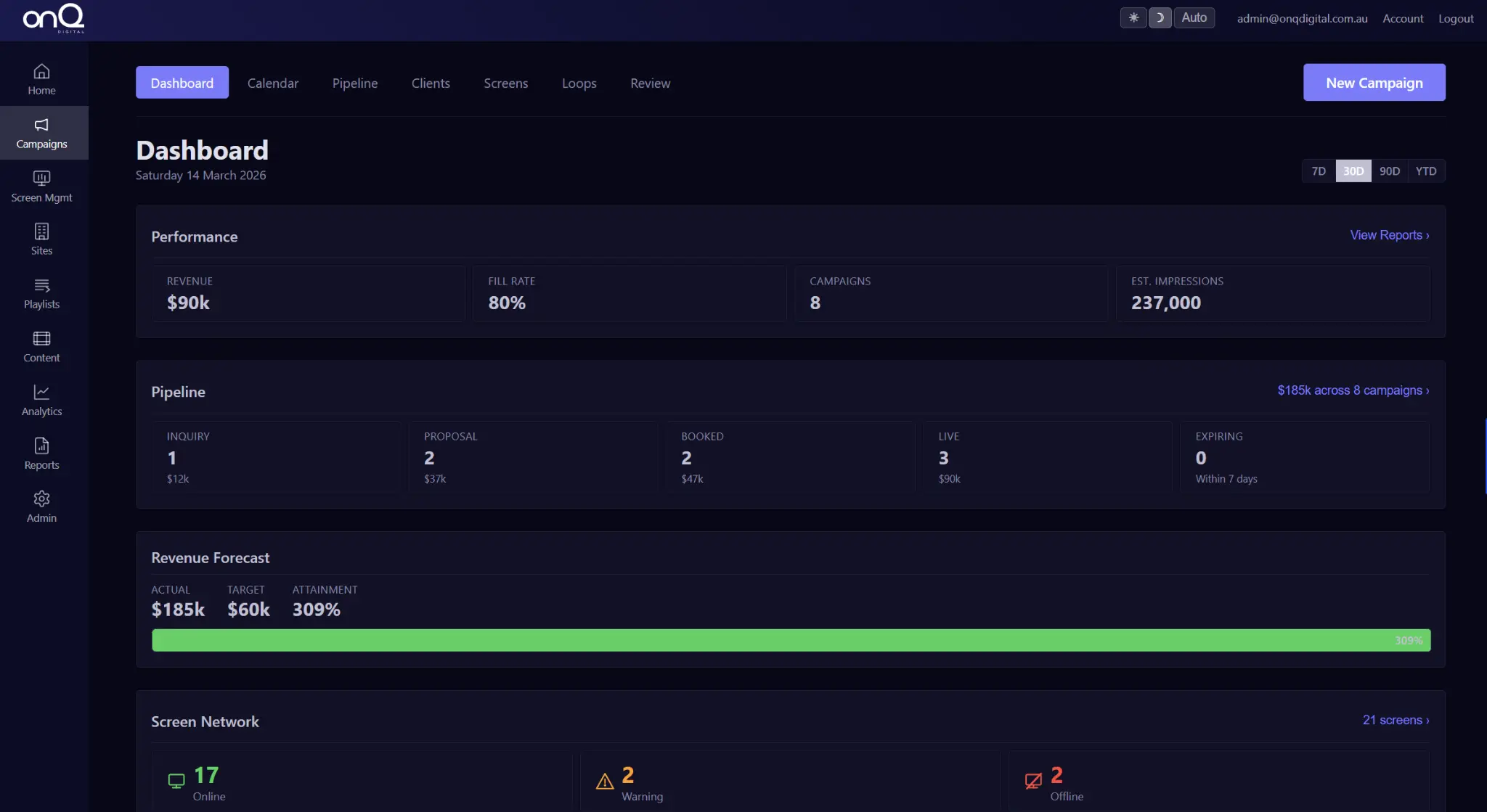
Build, schedule, and govern retail media campaigns across your entire screen network. Set date ranges, dayparts, screen targets, and advertiser rules with automated expiry and proof-of-play reporting built in.

Date-Range & daypart scheduling

Advertiser targeting & rules

Automated campaign expiry

Proof-of-play reporting

Total Network Visibility

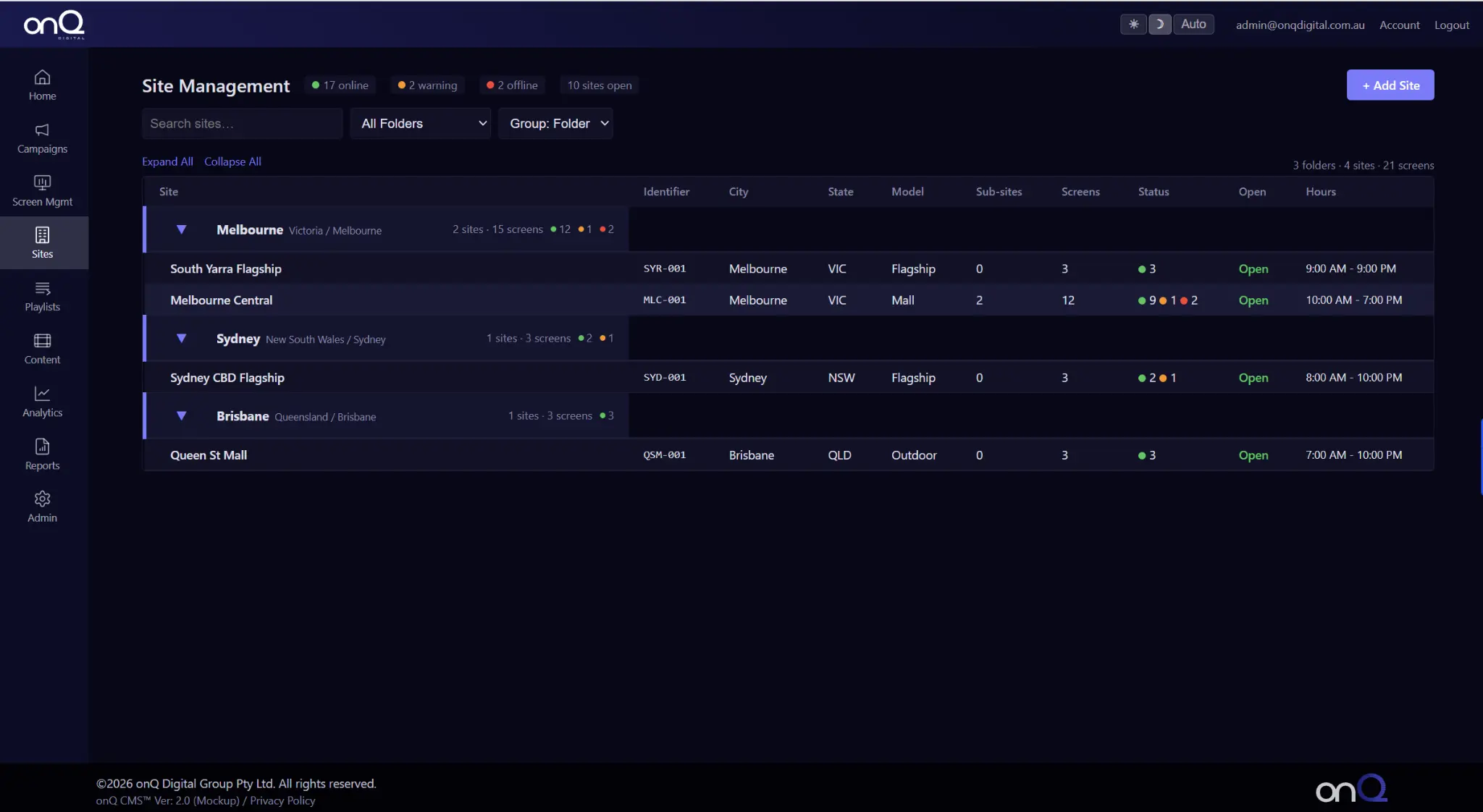
Monitor every screen across every site from one pane of glass. View live status, last-seen timestamps, content playing, and device health. Proactive alerts flag issues before they become outages.

Live screen status & health

Last-seen & uptime tracking

Remote content verification

Procative fault alerting

Multi-site Governance

Organise your screen estate by site, region, or retail zone. Assign screens to groups, set location-specific content rules, and deploy national campaigns with hyper-local overrides all from a single account.

Site & region grouping

Role-based site access

Location-specific content rules

National & local campaign logic

Drag-and-Drop Playlist Builder

Create unlimited playlists and campaign rotations with drag-and-drop ordering. Structure content by promotion, advertiser, season, or audience then assign to any screen or group in seconds.

Unlimited playlist creation

Drag-and-drop ordering

Brand & supplier rotations

Retail media slot management

Centralised Content Library

Upload images, video, and media assets in seconds. High-resolution files are processed and stored in a structured library with folder and campaign-based organisation. All standard media formats supported.

Fast Bulk upload

Folder & Campaign organisation

All standard media formats

Content tagging & classification

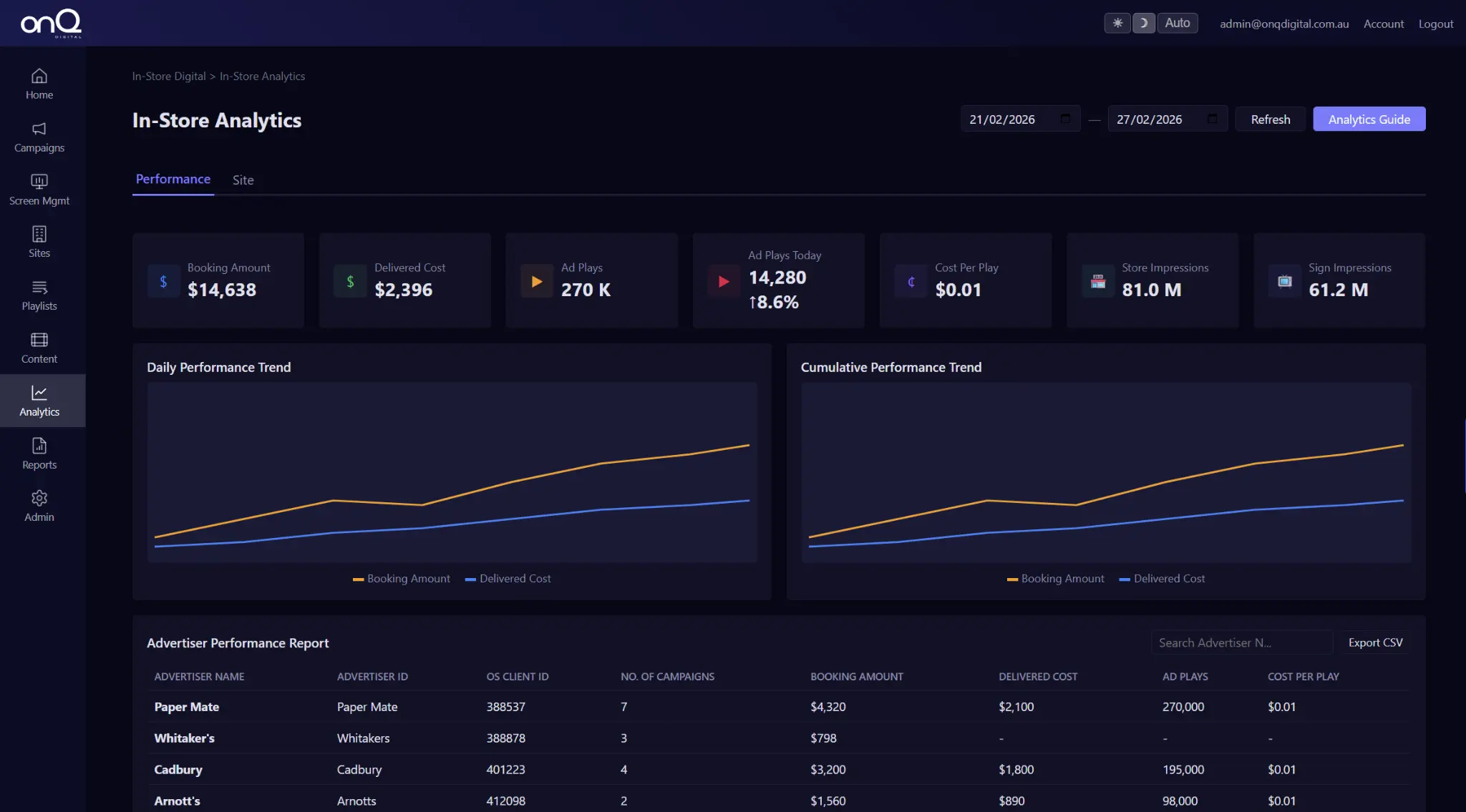
Network-Level Analytics

Understand how your network is performing with campaign-level analytics, screen utilisation data, and audience delivery metrics. Connect to attention analytics for verified impression reporting.

Campaign delivery analytics

Screen utilisation reporting

Audience delivery metrics

Attention analytics intergration

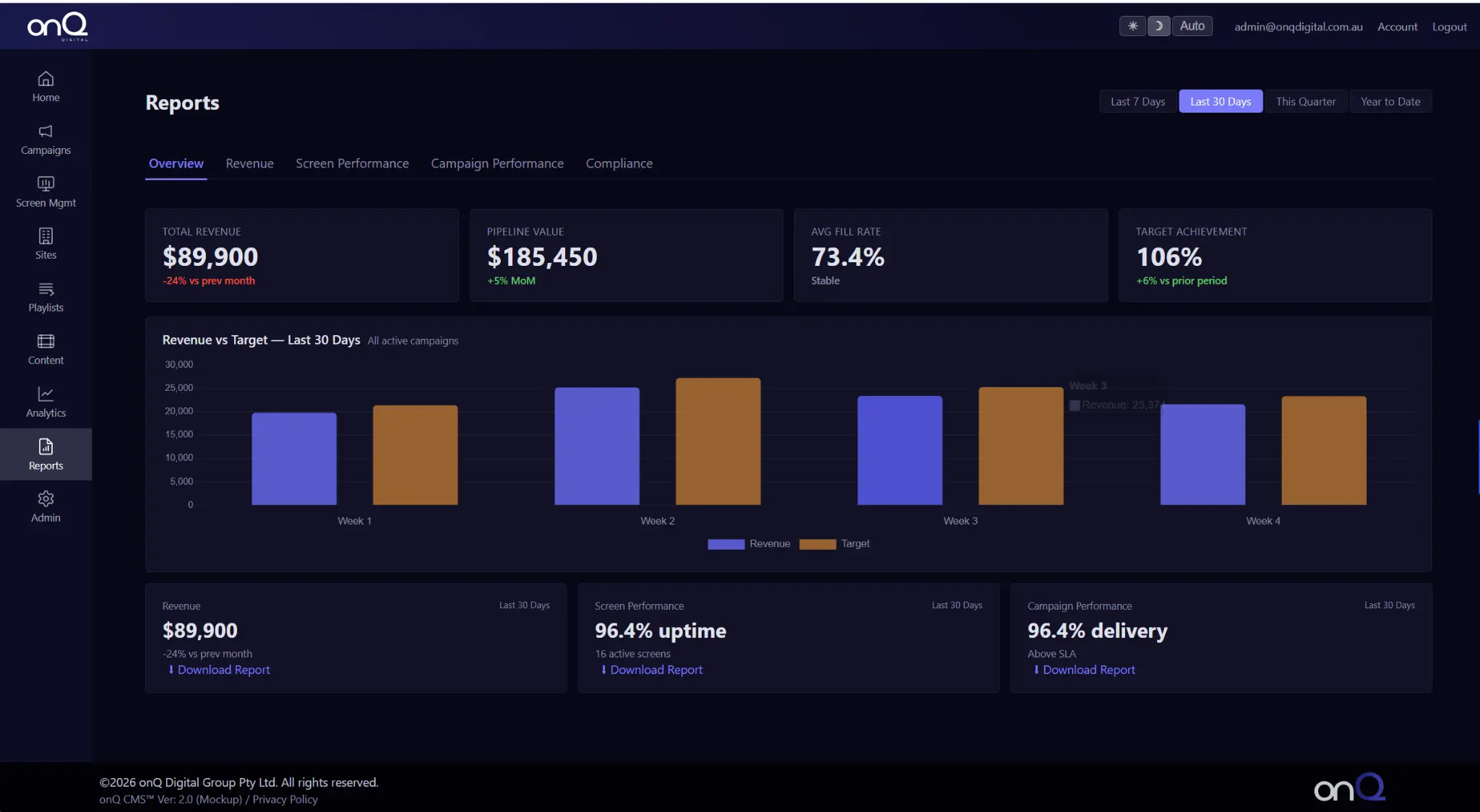
Proof-of-play & Advertiser Reporting

Generate proof-of-play reports, advertiser delivery summaries, and campaign reconciliation exports. Automated reporting reduces manual admin and gives media buyers the verification they need.

Automated proof-of-play

Scheduled Report Delivery

Campaign Reconciliation exports

Advertiser Delivery Summaries

What is onq CMS?

Digital Signage Software Built for Networks, Not Just Screens

onQ CMS is a cloud-based digital signage software platform used to manage, schedule, monitor, and report content across multi-site screen networks. It supports digital signage campaigns, retail media advertising, proof-of-play reporting, screen targeting, and real-time content updates from a central dashboard.

Managing digital signage should be operationally simple, but commercially powerful. onQ CMS combines user-friendly digital signage software with advanced retail media controls, campaign governance, and reporting capability. It is designed for organisations that operate screen networks, not just screens.

Screen Networks

Manage thousands of screens across multiple sites from one dashboard

Campaign Controls

Schedule, target, and govern campaigns with full advertiser accountability

Retail Media

Built-in retail media features for monetisation and advertiser reporting

API Intergrations

Connect to POS, data systems, and third-party platforms seamlessly

Platform Features

Everything your network Needs

onQ CMS combines operational simplicity with commercial power, from content scheduling to programmatic monetisation.

Instant Content Updates

Push content changes across your entire screen network in seconds. No manual screen-by-screen deployment one click updates every location simultaneously.

Screen Targeting & Zones

Deploy content to individual screens, groups, regions, or retail media zones. National campaigns and hyper-local messaging from the same platform.

Proof-ofPlay Reporting

Every content play is logged with timestamp, screen ID, and duration. Automated reports give advertisers and internal stakeholders verified delivery data.

API & Data Intergrations

Connect onQ CMS to POS systems, product databases, and third-party data sources. Menu boards, price displays, and promotions update automatically from live data.

Unlimited Users & Roles

Add unlimited users with role-based access controls. Separate permissions for content managers, campaign operators, advertisers, and network administrators.

Campaign Governance

Content validity controls ensure campaigns only run within approved windows. Start/end dates, expiry rules, and advertiser restrictions enforced automatically.

Ai & Context-Aware Automation

Adjust content delivery based on time, audience patterns, demand signals, or campaign triggers. Improve engagement while reducing manual intervention.

Device Health Monitoring

Proactive monitoring flags device issues before they become outages. Live status, last-seen timestamps, and remote diagnostics for every screen in your network.

core CMS workflow

From Upload to On-Screen in Minutes

Four steps from content upload to live deployment across your entire network.

Upload Content Fast

Upload images, video, and media assets into the digital signage CMS in seconds. High-resolution files are processed and stored in a structured content library. Folder and campaign-based organisation keeps creative assets easy to manage at scale.

Build Playlists & Rotations

Create unlimited playlists and campaign rotations using drag-and-drop ordering. Structure content by promotion, advertiser, season, or audience. Playlists can function as brand rotations, supplier campaigns, retail media slots, or promotional loops.

Schedule Campaigns

Schedule playlists and campaigns by date, time, daypart, or campaign window. Perfect for retail media buys, seasonal promotions, and launch events. Features include time-of-day scheduling, date-range campaigns, automated expiry, and daypart retail media slots.

Assign to Screens & Zones

Deploy content to individual screens, groups, regions, or retail media zones. Assignment is completed in a few clicks through the CMS dashboard. Supports both national campaigns and hyper-local messaging strategies.

API & Data Intergrations

Content That Updates Itself

Digital signage content can be connected directly to POS and operational systems. Menu boards, price displays, and product promotions update automatically based on live data, without manual intervention.

Content tagging enables structured organisation by campaign, advertiser, product category, season, or objective. Tagged assets can be automatically triggered into rotations based on campaign rules, improving retail media campaign automation, seasonal content switching, and promotion eligibility logic.

  • POS System Integration
  • Real-Time Price Updates
  • Best-Seller Highlighting
  • Promotion Logic
  • AI Context-Aware Triggers
  • Dynamic Content Rules
POS-Connected Content

Menu boards, price displays, and product promotions update automatically from live POS data. Ideal for QSR, grocery, and high-turnover retail environments.

Content Tagging & Classification

Tag assets by campaign, advertiser, product category, season, or objective. Automated triggers fire content into rotations based on campaign rules.

Ai & Content Aware Automation

Adjust content delivery based on time, demand, audience patterns, or campaign triggers. Improve engagement while reducing manual intervention.

Programmatic SSP

Why the onQ SSP Is Superior

A concise comparison for retail media monetisation and programmatic DOOH.

True Multi-DSP Access

Most SSPs connect to 3, 6 DSPs. onQ SSP connects to 20+ DSPs globally including Criteo, Zitcha, The Trade Desk, Yahoo, Amobee, and Google DV360 creating a massively expanded buyer pool and lifting CPMs 30 to 80% vs waterfall models.

Superior RTB Auction Logic

True Real-Time Bidding with a unified auction engine. Every impression enters a live auction, all 20+ DSPs bid simultaneously, and the highest bid always wins. Dynamic price discovery ensures market value not a pre-set price.

No Channel Conflicts

onQ SSP is neutral. It does not own any screens, does not operate a competing network, and does not create conflicting commercial incentives. 100% of demand is treated equally with no bias and no hidden margin.

Designed for Retal Media

Supports retail zones, category aisles, dwell time, product-level targeting, daypart vs dwellpart bidding, SKU-category mapping, and in-store brand safety aligned to supermarkets, pharmacy, big box retail, and FMCG.

Programmatic SSP

onQ SSP vs Vistar vs Broadsign vs Hivestack/Perion

A concise comparison for retail media monetisation and programmatic DOOH.

Criteria onQ SSP Vistar Media Broadsign / Place Exchange Hivestack / Perion
Positioning Neutral mediation / header bidding layer yield maximisation across multiple DSPs Full-stack DOOH platform (DSP + SSP + ad server) CMS + SSP powerhouse with deep integrations and large DSP ecosystem Full-stack DOOH adtech (DSP, SSP, measurement, curation)
Auction Model True RTB mediation across all connected DSPs → highest clearing price per slot Strong DSP/SSP RTB but vertically integrated RTB via Reach + Place Exchange but within its own ecosystem Full-stack RTB, but with commercial conflicts across buy/sell/data
Multi-DSP Access 20+ DSPs simultaneously creates competition, improves CPMs Broad DSP access but often prioritises buyers within their ecosystem Broad DSP access but often prioritises buyers within their ecosystem Broad DSP access but often prioritises buyers within their ecosystem
Conflicts of Interest No owned media, no DSP bias, no CMS lock-in Vertically integrated natural incentives to optimise for their own stack Vertically integrated natural incentives to optimise for their own stack Vertically integrated natural incentives to optimise for their own stack
Retail Media Suitability Ideal for in-store networks — retailer's CMS stays in control, SSP maximises yield Excellent demand pipes but less flexible as control shifts into their platform Excellent demand pipes but less flexible as control shifts into their platform Excellent demand pipes but less flexible as control shifts into their platform
Commercial Transparency Clear structure, no hidden margin stacking, higher % retained by retailer Standard SSP/DSP fee stack (15 to 30% SSP + 10 to 25% DSP) Standard SSP/D
Neutral, retailer-first infrastructure. onQ SSP is designed to maximise yield without forcing you into a closed ecosystem.
FAQ's

Common Questions

What is onQ CMS digital signage software?

onQ CMS is a cloud-based digital signage software platform used to manage, schedule, monitor, and report content across multi-site screen networks. It supports digital signage campaigns, retail media advertising, proof-of-play reporting, screen targeting, and real-time content updates from a central dashboard.

What makes onQ CMS different from standard digital signage software?

onQ CMS combines traditional digital signage content management with retail media campaign controls, advertiser reporting, API data integrations, and network-level monitoring. It is designed for enterprise screen networks, not just standalone displays.

What can onQ CMS manage?

onQ CMS manages digital signage screens, content playlists, campaign schedules, retail media campaigns, screen groups and regions, proof-of-play logs, device health monitoring, and data-driven content triggers.

Is onQ CMS suitable for retail media networks?

Yes. onQ CMS includes retail media features such as campaign scheduling, advertiser targeting, proof-of-play reporting, and screen inventory control, making it suitable for in-store retail media networks.

Can onQ CMS connect to POS and data systems?

Yes. onQ CMS supports API and data integrations with POS systems, product databases, and third-party data sources. Menu boards, price displays, and product promotions can update automatically based on live data.

How many users and screens can onQ CMS support?

onQ CMS supports unlimited users with role-based access controls and is designed to scale across networks of any size, from single-site deployments to national networks with thousands of screens.

Get started

Ready to See onQ CMS in action?

Book a live demo and see how onQ CMS can transform your screen network into a governed, scalable retail media channel.